0 ratings






товар №:
496095
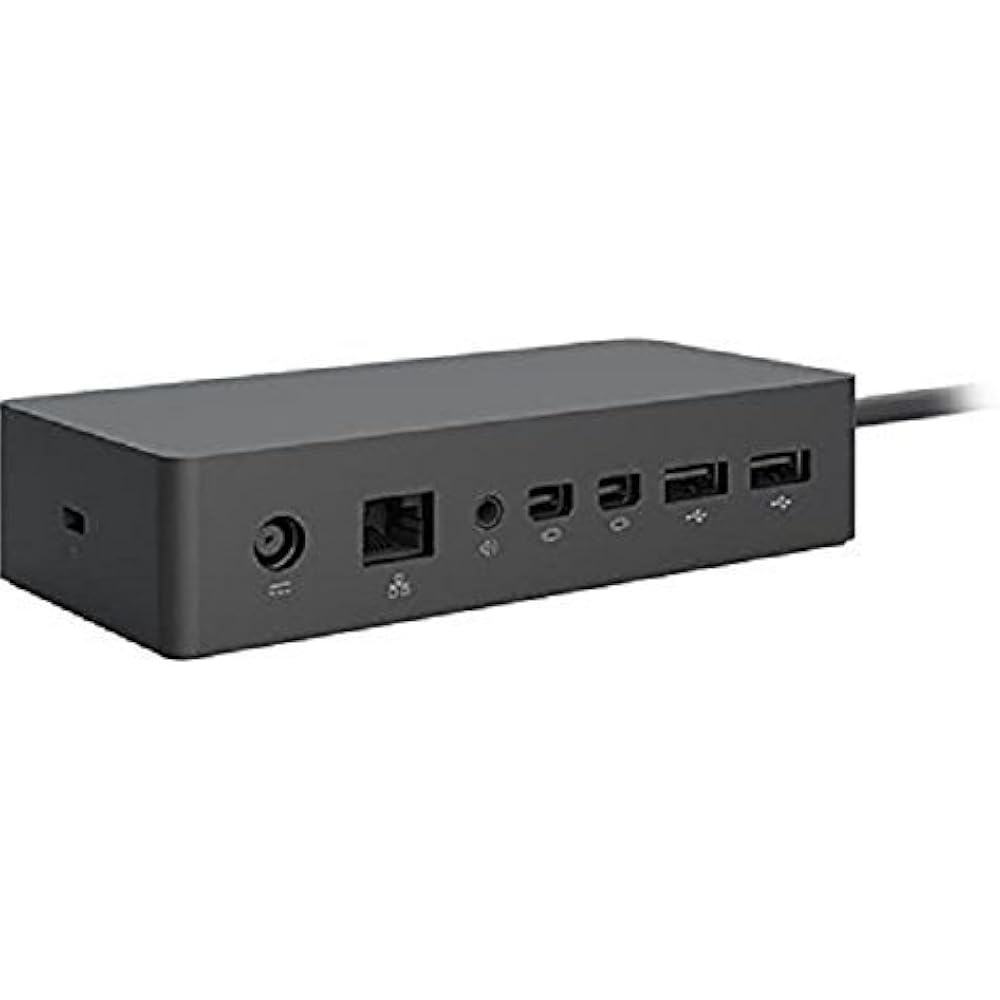
Microsoft Surface Dock (Pd9-00003),Black
87% of respondents would recommend this to a friend
товар №:
496095
UZS 1639423
Price Details
Excluding Shipping & Custom charges ( Shipping and custom charges will be calculated on checkout )
*All items will import from США
32%
В наличии
 Импортировано из магазина USA
QTY:
Закажите сейчас и получите товар приблизительно Четверг, Июнь 25
Secured transaction
Ubuy works hard to protect your security and privacy. Our advanced payment security system ensures confidentiality by encrypting your information during transmission using AES (Advanced Encryption Standards) and SSL (Secure Socket Layer) protocols. Your payment details are 100% secure as we do not share your payment details with third party sellers.
Our Top Logistics Partners


Transform your surface into a desktop PC by plugging in your dock with the surface connect cable.

Fast
Shipping

Free
Return*

Secure Packaging

100% Original Products

PCI DSS Compliance

ISO 27001 Certified


Note: Step Down Voltage Transformer required for using electronics products of США store (110-120). Recommended power converters Купите сейчас.


What Stands Out
Multiple Ports
Equipped with various ports, the Surface Dock allows seamless connectivity to multiple devices like monitors, keyboards, and external drives, enhancing productivity without cable clutter.
Fast Charging
The Surface Dock provides quick charging capabilities, ensuring your Surface device stays powered during intense work sessions, which is essential for professionals on the go.
Sleek Design
With its modern black finish and compact size, the Microsoft Surface Dock complements any workspace while ergonomically maintaining functionality, making it an attractive addition to your setup.
Информация о продукте
- Compatibility: Surface go, surface laptop, surface laptop 2, surface pro, surface pro 3, surface pro 4,surface pro 6, surface book, surface book 2
- 2x Mini display ports, 1x Gigabit Ethernet port
- 4 USB 3.0 ports, 1x audio out port
- Magnetic surface connect cable. Transform your surface into a desktop PC by plugging in your dock with the surface connect cable. External power supply
- High speed data transferring
| Hardware Interface | Ethernet |
| Compatible Devices | Microsoft Surface Pro 3 |
| Total Usb Ports | 4 |
| Number of Ports | 4 |
| Total Number of HDMI Ports | 2 |
| Smart Home Compatibility | Not Smart Home Compatible |
| Item Dimensions L x W x H | 5.12"L x 1.18"W x 2.36"H (13 x 3 x 6 cm) |
| Item Weight | 2.64 Pounds (1.2 kg) |
| Color | Black |
| Brand | Microsoft |
| Global Trade Identification Number | 00885370996340 |
| UPC | 885370996340 |
| Manufacturer | Microsoft |
| Model Number | PD9-00003 |
| Mfr Part Number | PD9-00003 |
| Unit Count | 1.0 Count |
| Total USB Ports | 4 |
| Product Dimensions (L x W x H) | 5.12"L x 1.18"W x 2.36"H (13 x 3 x 6 cm) |
| Total HDMI Ports | 2 |
| Number of Items | 1 |
| Package Weight | 4.34 Pound |
Who Should Buy?

-
Remote Workers
Ideal for remote workers needing multiple connections and quick access to peripherals for better productivity.
-
Students
Perfect for students using Surface devices for presentations and who need to connect to projectors and monitors.
-
Home Offices
Great for home office setups, allowing seamless switching between laptop and desktop peripherals for enhanced workflow.

-
Casual Users
Not suitable for casual users who require basic functionality without the need for multiple display connections.
-
Travelers
Not ideal for frequent travelers due to its stationary design, making it less portable for on-the-go users.
-
Budget-Conscious
May not be suitable for budget-conscious individuals as it can be considered expensive for basic docking needs.
ОПИСАНИЕ ТОВАРА
Есть вопрос? Пообщайтесь с нами в чате
Вопросы и ответы клиентов
-
вопрос:
What are the main features of the Microsoft Surface Dock (Pd9-00003)?
отвечать: The Microsoft Surface Dock (Pd9-00003) features multiple ports including two Mini DisplayPort outputs, multiple USB 3.0 ports, and an Ethernet connection. This allows users to connect dual 4K monitors, charge your Surface device, and access high-speed internet all through a single dock. It enhances productivity, especially in multi-tasking environments. For instance, professionals working from home can seamlessly transition from a laptop setup to a desktop environment by simply connecting their Surface device to the dock. -
вопрос:
Is the Microsoft Surface Dock compatible with all Surface devices?
отвечать: The Microsoft Surface Dock is designed specifically to work with Surface devices equipped with the Surface Connect port. This includes models like the Surface Pro 4, Surface Book, Surface Laptop, and newer models. Compatibility ensures that users can easily power their devices while connecting to peripherals. As an example, a Surface Pro user can enjoy a desktop experience by using the dock to connect external monitors and USB devices without any hassle. -
вопрос:
How does the docking station improve productivity?
отвечать: By utilizing the Microsoft Surface Dock, users can significantly boost productivity by setting up a multi-monitor workstation, which allows for better organization of applications and windows. The dock supports dual 4K displays, enabling users to have expansive screen real estate for tasks like graphic design or programming. For instance, a graphic designer can keep design tools on one screen and previews on another, streamlining their workflow. -
вопрос:
Can I charge my Surface device while using the dock?
отвечать: Yes, the Microsoft Surface Dock provides power to your Surface device while connected, ensuring that you can work uninterrupted. It eliminates the need for separate charging cables and also provides ample power to run connected peripherals. For example, using the dock during a video conference lets users stay fully powered while accessing cameras and microphones plugged into the dock. -
вопрос:
What connectivity options does the Surface Dock support?
отвечать: The Surface Dock offers various connectivity options, including USB 3.0 ports for high-speed data transfer, a Gigabit Ethernet port for reliable internet access, and Mini DisplayPort outputs for connecting monitors. These diverse options make it suitable for different professional setups, allowing users to customize their workspace. A typical office scenario would involve connecting a printer and external drives through the USB ports while maintaining a stable internet connection. -
вопрос:
What is the design of the Microsoft Surface Dock like?
отвечать: The Microsoft Surface Dock has a sleek, minimalistic design that complements Surface devices aesthetically. It is compact, allowing it to fit on most desks without taking up much space. This design not only enhances the visual appeal of a workspace but also promotes organized cable management. In a professional setting, this can lead to a cleaner and more efficient work environment. -
вопрос:
How do I set up the Microsoft Surface Dock?
отвечать: Setting up the Microsoft Surface Dock is straightforward: simply plug the dock into a power outlet and connect your Surface device using the Surface Connect cable. From there, you can add peripherals like keyboards, mice, and monitors through the available ports. For users transitioning from a laptop to a desktop experience, this simplicity allows for quick adjustments without technical setup challenges. -
вопрос:
Does the Surface Dock support audio output?
отвечать: Yes, the Microsoft Surface Dock supports audio output through connected displays or speakers. When attaching monitors equipped with built-in speakers, audio can be routed seamlessly, making it ideal for video conferencing or media playback. This feature enhances the overall experience for presentations or virtual meetings, as users can maintain sound quality without additional complications. -
вопрос:
Are there any performance limitations when using the Surface Dock?
отвечать: While the Surface Dock is highly capable, performance can vary based on the connected Surface device and the number of peripherals used simultaneously. For instance, while running dual 4K monitors, heavy applications may cause strain on lower-end Surface models. Users should check individual specifications and optimize their setups accordingly to ensure the best experience. -
вопрос:
Where can I buy the Microsoft Surface Dock (Pd9-00003)?
отвечать: You can purchase the Microsoft Surface Dock (Pd9-00003) from Ubuy in Uzbekistan. Ubuy offers a user-friendly shopping experience with a variety of options for quick and convenient purchasing tailored to customers in your region.
Microsoft Docking Stations PD9-00003 Editorial Review


The Microsoft Surface Dock PD9-00003 allows users to connect their Surface Pro 3 or 4 tablets to multiple monitors and peripheral devices through the charging port. The dock also charges the tablet when in use and connects with 110-volt power. Users are able to run two 4K monitors at 30Hz, or one 4K monitor at 60Hz while connected to the dock and an additional monitor connected through the Surface Pro 4’s built-in charging port. The dock is not compatible with the Surface 2, but is compatible with the Surface Book and the Surface Go. Overall, customer reviews indicate that this product works well and is easy to set up, however, some have expressed disappointment with the lack of specific ports, such as a USB Type-C. **
Customer Reviews & Ratings
4460 оценки клиентов
-
5 звезда
76%
-
4 звезда
11%
-
3 звезда
5%
-
2 звезда
2%
-
1 звезда
6%
Оцените этот товар
Поделитесь своими впечатлениями
Плюсы
- Works as advertised
- Easy plug-and-play setup
- Charges the Surface Pro while in use
- Eliminates wire clutter
- Compatible with the Surface Pro 3, 4, Book, and Go
Минусы
- Limited to 30Hz when running two 4K monitors
Product Price History
Важная информация
- Ограничения: обратите внимание, что для товаров, поставляемых за границу, гарантия производителя может быть недействительной; обслуживание от производителя может быть недоступно; руководства по эксплуатации, а также инструкции и предупреждения о безопасности могут быть не на языках страны назначения; товары (и сопутствующие материалы) могут не быть разработаны в соответствии со стандартами, спецификациями и требованиями к маркировке страны назначения; товары также могут не соответствовать напряжению в стране назначения и другим электрическим стандартам (при необходимости требуется использование адаптера или преобразователя). Получатель несет ответственность за обеспечение законного ввоза товара в страну назначения. При заказе через Ubuy или его аффилированных лиц получатель является зарегистрированным импортером и должен соблюдать все законы и правила страны назначения.
- Не все товары на Ubuy выставлены на продажу, поскольку Ubuy — это глобальная поисковая система. На товары распространяются законы в области экспорта и торговли.
UZS 1639423
Закажите сейчас и получите товар приблизительно Четверг, Июнь 25
This item is not restrict in my country.(Please click on above link if this item is not restrict in your country, So our team will review and allow.)
QTY:
Secured transaction
Ubuy works hard to protect your security and privacy. Our advanced payment security system ensures confidentiality by encrypting your information during transmission using AES (Advanced Encryption Standards) and SSL (Secure Socket Layer) protocols. Your payment details are 100% secure as we do not share your payment details with third party sellers.
Our Top Logistics Partners
Fastest cross-border delivery
Особенности и преимущества
- Connectivity with 4 USB 3.0 ports, 2x Mini display ports, 1x Gigabit Ethernet port, and 1x audio out port.
- Compatible with a range of Microsoft Surface devices.
- External power supply.
- High speed data transferring.
- Magnetic surface connect cable.
- Transforms your Surface device into a desktop PC.