- Home Page /
- Office Products /
- Office Electronics /
- Printers & Accessories /
- Computer Printers /
- Label Printers /
- Bluetooth Shipping Label Printer with Built-i...
0 ratings






Item #:
248168564
Bluetooth Shipping Label Printer with Built-in Label Bin
85% of respondents would recommend this to a friend
Item #:
248168564
UZS 1174883
Price Details
Excluding Shipping & Custom charges ( Shipping and custom charges will be calculated on checkout )
*All items will import from US
In stock
 Imported from USA store
QTY:
Order now and get it around Wednesday, September 16
Secured transaction
Ubuy works hard to protect your security and privacy. Our advanced payment security system ensures confidentiality by encrypting your information during transmission using AES (Advanced Encryption Standards) and SSL (Secure Socket Layer) protocols. Your payment details are 100% secure as we do not share your payment details with third party sellers.
Our Top Logistics Partners


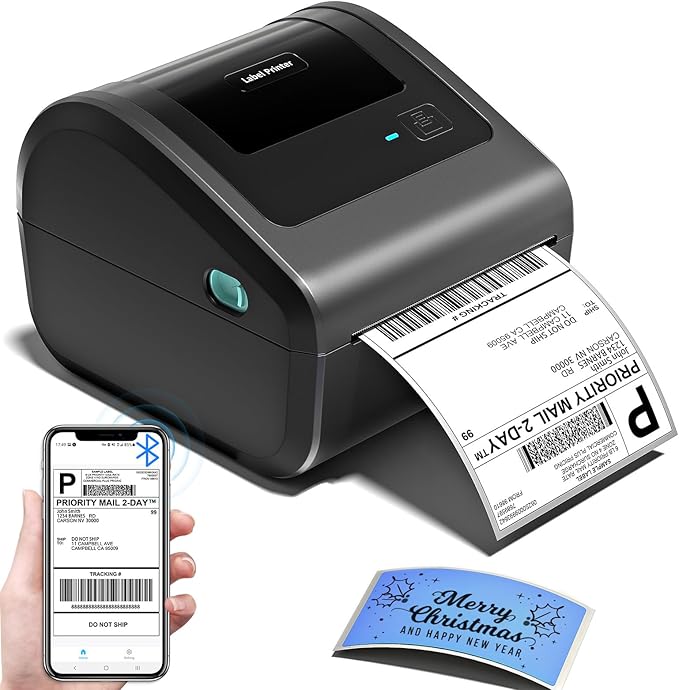
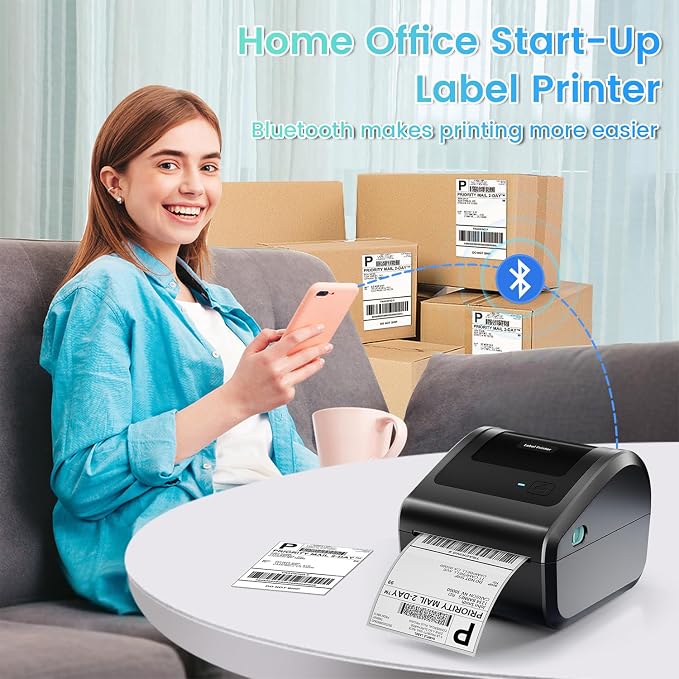
Truely Bluetooth Connection, Make Work more Wireless and Simple

Fast
Shipping

Free
Return*

Secure Packaging

100% Original Products

PCI DSS Compliance

ISO 27001 Certified



Note: Step Down Voltage Transformer required for using electronics products of US store (110-120). Recommended power converters Buy Now.


What Stands Out
Wireless Connectivity
Enjoy hassle-free printing with Bluetooth technology, eliminating messy cables and allowing you to print directly from your mobile devices. Ideal for busy environments needing quick and efficient label creation.
Integrated Label Storage
The built-in label bin provides easy access and organization for your labels, streamlining your workflow and reducing clutter. Perfect for small spaces and efficient shipping operations.
Compact Design
Designed for portability, this printer fits effortlessly into any workspace without sacrificing performance. It's lightweight and ideal for on-the-go professionals or home offices looking for a powerful, space-saving solution.
Product Details
| Printer Type | Thermal |
| Other Special Features of the Product | Bluetooth and USB Connection, Compatible with Mobile Phone & PC, Thermal Printing, No ink No toner, Auto Detection,Built-in Paper Bin |
| Printer Output Type | Monochrome |
| Item Weight | 0.97 kg |
| Item Dimensions D x W x H | 7.3"D x 6.3"W x 5.35"H (18.5 x 16 x 13.6 cm) |
| Controller Type | Android, iOS |
| Print media | Labels |
| Maximum Copy Speed Black and White | 72 pages_per_minute |
| Compatible Devices | IOS & Android Phone, Pad, Mac OS, Windows system, Chrome OS, Linux system |
| Ink Color | black |
| Additional Printer Functions | Print Only |
| Control Method | App |
| Number of Trays | 1 |
| Processor Count | 1 |
| Number of Drivers | 1 |
| Resolution | 203 x 203 DPI |
| Maximum Media Size | Paper Width: 1"-4.6" (25.4-117mm) |
| Maximum Sheet Capacity | 250 |
| Paper Size | 4 inches (10.2 cm) |
| Output sheet capacity | 250 |
| Printer Connectivity Type | Bluetooth, USB |
| Hardware Interface | Bluetooth |
| Maximum Copy Resolution Black and White | 203 dpi |
| Brand | Omezizy |
| Model Name | D450-BT |
| Model Number | D450BT |
| Built-In Media | Built-in label holder, D450-BT Label Printer, Labels, Power Adapter & Cable, USB Cord & Type C Convertor |
| Series Number | 450 |
| Model Series | D450-BT |
| Specific Uses For Product | printer |
| Unit Count | 1 Count |
| Item Type Name | Sofabed |
| Manufacturer | Omezizy |
| B&W Pages per Minute | 127 pages_per_minute |
| Color | Grey |
| Color Depth | 1 bpp |
| Maximum print Resolution Color | 203 dots_per_inch (515.6 cm) |
| Maximum Print Resolution Black and White | 203 dots_per_inch (515.6 cm) |
| Duplex | Simplex |
| Connectivity Technology | Bluetooth, USB |
| Printing Technology | Thermal |
| Special Feature | Bluetooth and USB Connection, Compatible with Mobile Phone & PC, Thermal Printing, No ink No toner, Auto Detection,Built-in Paper Bin See more |
| Printer Output | Monochrome |
| Max Printspeed Monochrome | 127 pages_per_minute |
| Product Dimensions (L x W x H) | 7.3"D x 6.3"W x 5.35"H (18.5 x 16 x 13.6 cm) |
What's in the box
D450-BT Label Printer
USB Cord & Type C Convertor
Power Adapter & Cable
Labels
Built-in label holder
Product Description
Have any Query? Chat with us
Customer Questions & Answers
-
Question:
What is a Bluetooth thermal label printer with a built-in label compartment?
Answer: A Bluetooth thermal label printer with a built-in label compartment is a device designed to wirelessly print labels using thermal printing technology and features an integrated compartment for storing label rolls. This design simplifies the printing process, as users can load and store labels in one convenient spot. Often utilized in retail, shipping, and inventory management, these printers enhance workflow efficiency by enabling quick and easy label printing without the need for cumbersome setup or manual loading of labels. -
Question:
How does Bluetooth connectivity enhance the use of thermal label printers?
Answer: Bluetooth connectivity allows for wireless printing from a variety of devices, such as smartphones, tablets, and laptops. This feature enhances convenience, enabling users to print labels on-the-go or from different locations within a workspace. By eliminating the need for cables, users can easily integrate the label printer into their workflow, ideal for environments like warehouses or retail settings where mobility and accessibility are crucial for productivity. -
Question:
What types of labels can I print with a Bluetooth thermal label printer?
Answer: Bluetooth thermal label printers are versatile and can print various types of labels, such as shipping labels, barcode labels, product labels, and address labels. The thermal printing technology ensures that labels are printed quickly and with high-quality text and graphics. This versatility makes them ideal for businesses such as eCommerce, logistics, and manufacturing, where different labeling needs arise regularly. -
Question:
Is it necessary to use specific label rolls with these printers?
Answer: Yes, it is important to use compatible label rolls specifically designed for thermal printing. Using the right size and type ensures optimal printing quality and prevents jams or misfeeds. Most Bluetooth thermal label printers indicate recommended specifications for label sizes and types. This is crucial for ensuring that printing tasks are efficient and that the desired output meets professional standards, particularly for product labeling in retail or shipping. -
Question:
Can I print from my smartphone or tablet using this printer?
Answer: Absolutely! Most Bluetooth thermal label printers support mobile printing via dedicated apps that can be downloaded on smartphones or tablets. This allows you to effortlessly create and print labels directly from your mobile device. This feature is especially beneficial for small businesses or freelancers who need to print labels while away from their desks, providing a seamless and efficient way to manage labeling tasks. -
Question:
How do I set up the Bluetooth connection with my printer?
Answer: Setting up a Bluetooth connection with your thermal label printer generally involves turning on the printer, enabling Bluetooth on your device, and pairing the two. Instructions typically vary by model but can often be found in the printer’s manual or app. Proper setup is essential for ensuring the printer is recognized by your device and can reliably receive print jobs, making it a vital first step before actual printing tasks begin. -
Question:
What are the advantages of a built-in label compartment?
Answer: A built-in label compartment offers several advantages, including convenience and improved organization. It allows you to store labels within the printer, eliminating the need for separate storage solutions and reducing clutter. This feature is especially beneficial in busy environments where space is limited and quick access to labels is necessary, allowing for a more streamlined workflow during label printing tasks. -
Question:
What can I do if I encounter printing issues with my thermal label printer?
Answer: If you encounter printing issues with your thermal label printer, common solutions include checking the label placement, ensuring proper connectivity, and verifying that the printer is properly powered on and configured. Consulting the user manual for troubleshooting tips can be helpful. If problems persist, contacting customer support or seeking professional assistance can ensure uninterrupted label printing, which is crucial in time-sensitive environments like shipping or inventory management. -
Question:
How can I maintain my Bluetooth thermal label printer for optimal performance?
Answer: To maintain your Bluetooth thermal label printer, regularly clean the thermal print head with recommended cleaning materials to prevent residue buildup, which can affect print quality. Additionally, check for firmware updates to ensure the printer operates efficiently with the latest features. Proper upkeep is vital in maintaining performance and longevity, especially in high-usage environments like retail or logistics where reliability is critical. -
Question:
Where can I buy a Bluetooth thermal label printer with a built-in label compartment in Uzbekistan?
Answer: You can purchase a Bluetooth thermal label printer with a built-in label compartment from Ubuy in Uzbekistan. Ubuy is known for offering a wide selection of electronics and printing solutions, ensuring that you find the perfect device that fits your labeling needs seamlessly. With their user-friendly website, you can explore specifications, features, and customer reviews to make an informed purchase.
Omezizy Label Printers D450BT Editorial Review


No editorial reviews found
Customer Reviews & Ratings
1165 customers ratings
-
5 Star
74%
-
4 Star
6%
-
3 Star
5%
-
2 Star
3%
-
1 Star
12%
Review this product
Share your thoughts with other customers
Platform Trust & Buyer Confidence

JG
Jazz
Verified buyer
“Easy to use and always helpful and sorts any issues I've had past and present”
1 September 2026 · via Trustpilot
EK
Emmanuel
Verified buyer
“I always receive support when I engage customer service. Overall my experience with UBUY has been top notch. Keep up the good work.”
31 August 2026 · via Trustpilot
F
fnd
Verified buyer
“The delivery was fast and the product came undamaged and authentic.”
29 August 2026 · via Trustpilot
LC
Leana
Verified buyer
“Ubuy is extremely efficient and to order online is an easy process. The verity of products to buy is really unlimited! My order was urgent and I got it on time. The products are great! Thank you Ubuy!”
25 August 2026 · via Trustpilot
HL
Hengo
Verified buyer
“Fast, convenient and cheap. Great store!”
27 August 2026 · via Trustpilot
Secure Checkout
Global Delivery
Easy Returns
Genuine Products
Product Price History
Important information
- Limitations : For products shipped internationally, please note that any manufacturer warranty may not be valid; manufacturer service options may not be available; product manuals, instructions, and safety warnings may not be in destination country languages; the products (and accompanying materials) may not be designed in accordance with destination country standards, specifications, and labeling requirements; and the products may not conform to destination country voltage and other electrical standards (requiring use of an adapter or converter if appropriate). The recipient is responsible for assuring that the product can be lawfully imported to the destination country. When ordering from Ubuy or its affiliates, the recipient is the importer of record and must comply with all laws and regulations of the destination country.
- Not all the products listed on Ubuy are for sale, as Ubuy is a global search engine. Products are subject to export/trade regulations.
UZS 1174883
Order now and get it around Wednesday, September 16
This item is not restrict in my country.(Please click on above link if this item is not restrict in your country, So our team will review and allow.)
QTY:
Secured transaction
PCI DSS compliant and ISO 27001:2022 certified, with encrypted payments and full buyer protection on every order.
Our Top Logistics Partners
Fastest cross-border delivery
Features & Benefits
- Seamless Bluetooth connection for hassle-free printing.
- Compatible with smartphones, tablets, Windows, and Mac.
- User-friendly app available for easy label printing.
- Free access to essential printing features with optional paid upgrades.
- Support for various templates to suit different business needs.
- Helps keep your workspace organized and tidy.
Ubuy Assurance
Experience worry-free shopping with 100% original products, PCI DSS-compliant payment security, ISO 27001-certified data protection, the fastest cross-border delivery, free returns *, and secure packaging on every order.